> ## Documentation Index
> Fetch the complete documentation index at: https://ijiajia.art/llms.txt
> Use this file to discover all available pages before exploring further.
# 服务端口
> 应用对外提供服务的端口
## 服务端口使用
应用通过服务端口对外提供服务,比如访问 ComfyUI、Web UI 等。
开机前一定要看应用教程,作者一般都有说明应用操作步骤,以及介绍入口是 6006 还是 6008,开机后点击对应的入口即可访问。
 1、点开后页面显示 404,等待几秒后重新刷新页面,因为开机后启动服务需要一些时间;如果一直404请查看应用教程,检查是否有额外的启动操作。
2、点开后页面空白,请耐心等待,因为 ComfyUI 这类页面很大加载需要些时间。
3、如果一直空白,参考常见问题排查。todo
## 服务端口原理
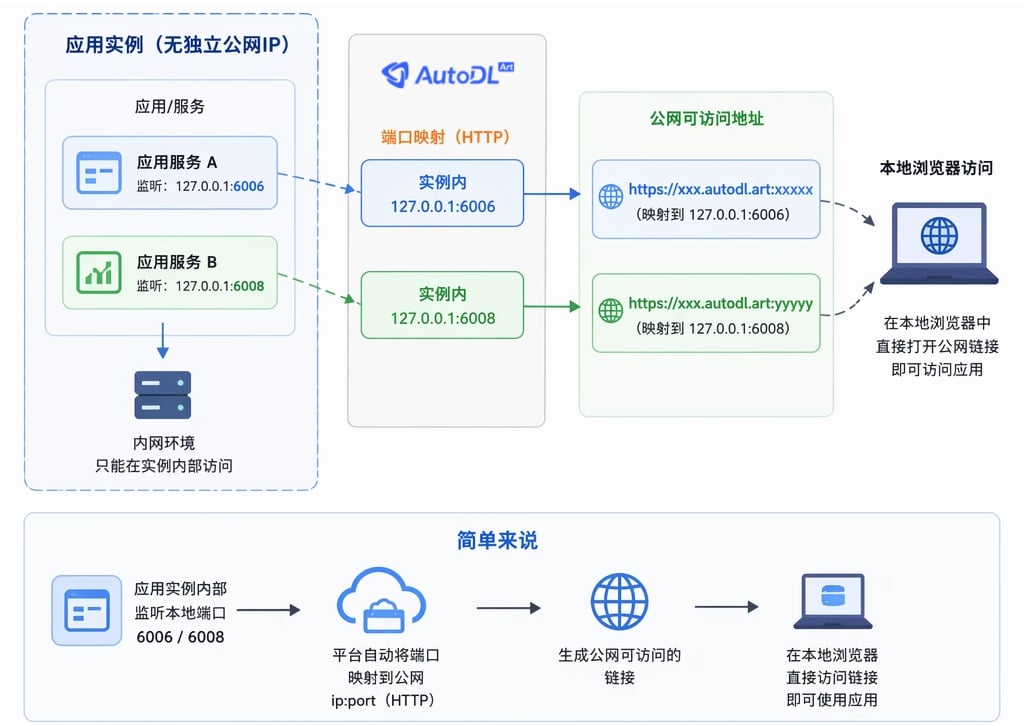
由于实例无独立公网IP,因此不能开放任意端口。但是AutoDL.art为每个实例的6006和6008端口都映射了一个可公网访问的地址,也就是将实例中的6006和6008端口映射到公网可供访问的ip:port上,映射的协议为HTTP。
简单说,应用实例内部监听本地的6006和6008端口,平台将自动映射成可访问的公网链接,公网链接可以直接在本地浏览器访问。
1、点开后页面显示 404,等待几秒后重新刷新页面,因为开机后启动服务需要一些时间;如果一直404请查看应用教程,检查是否有额外的启动操作。
2、点开后页面空白,请耐心等待,因为 ComfyUI 这类页面很大加载需要些时间。
3、如果一直空白,参考常见问题排查。todo
## 服务端口原理
由于实例无独立公网IP,因此不能开放任意端口。但是AutoDL.art为每个实例的6006和6008端口都映射了一个可公网访问的地址,也就是将实例中的6006和6008端口映射到公网可供访问的ip:port上,映射的协议为HTTP。
简单说,应用实例内部监听本地的6006和6008端口,平台将自动映射成可访问的公网链接,公网链接可以直接在本地浏览器访问。